
Download Iliad – AI Visual Art Creation Tool, Free, Secure, Cross‑Platform
Overview
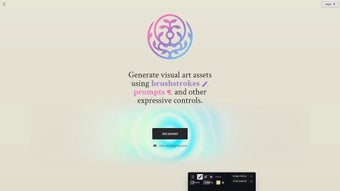
Iliad is a web‑based AI application that pushes the boundaries of visual art generation. Designed for both seasoned designers and hobbyist creators, the platform blends powerful machine‑learning algorithms with intuitive, expressive controls. Whether you need a quick concept sketch, a polished texture for a game environment, or a fully realized 3‑D voxel rendition of a 2‑D sketch, Iliad offers a seamless workflow that keeps creative control firmly in your hands.
The tool’s standout capabilities—custom brushstroke prompts, inpainting for precise touch‑ups, instant 2‑D‑to‑3‑D voxel conversion, and on‑the‑fly texture authoring—make it a one‑stop shop for iterative design work. Because it runs entirely in the browser, you can start a project on a Windows PC, continue on a Mac, and even fine‑tune on a tablet without installing heavyweight software. In short, Iliad merges robustness with accessibility, delivering a secure, always‑up‑to‑date environment for creating stunning visual assets.
Key Features and What They Mean for Your Workflow
- Expressive Brushstroke & Prompt Controls – Define the style, texture, and movement of each stroke through natural‑language prompts, giving you granular artistic direction.
- Inpainting Engine – Seamlessly fill gaps, erase unwanted elements, or refine details with AI‑driven suggestions that match surrounding pixels.
- 2‑D to 3‑D Voxel Conversion – Transform flat illustrations into interactive voxel models, perfect for rapid prototyping in game design.
- Instant Texture Authoring – Generate seamless, tileable textures on demand, ideal for concept art, environment creation, and material libraries.
- Real‑Time Collaboration – Share a live session link with teammates, enabling simultaneous edits and feedback without version‑control headaches.
- Cross‑Platform Accessibility – Operates on any modern browser, meaning Windows, macOS, Linux, Android, and iOS users can all participate.
- Secure Cloud Storage – Projects are saved encrypted in the cloud, allowing you to retrieve work from any device while keeping your IP safe.
- Regular Updates & Community Plugins – The development team pushes monthly updates and supports a marketplace for community‑built extensions.
Installation & Usage – Getting Started in Minutes
Because Iliad is a pure web application, there is no traditional installation process. Follow these three simple steps to start creating:
- Create a Free Account – Visit iliad.ai, click “Sign Up,” and choose either a Google, Apple, or email‑based login. The registration process takes less than a minute, and you’ll instantly receive 5 GB of secure cloud storage.
- Launch the Workspace – After logging in, you’ll be greeted by the dashboard. Click “New Project,” select the canvas size (from 512 × 512 up to 4096 × 4096), and choose a starter mode (Sketch, Texture, or Voxel).
- Start Creating – Use the left‑hand toolbar to select your brush type, adjust the AI prompt, or activate the inpainting tool. For voxel conversion, simply upload a 2‑D image and hit “Convert.” The AI runs in the background, delivering results within seconds. When you’re satisfied, hit “Export” to download PNG, JPEG, OBJ, or GLB files, or share a live link with collaborators.
Advanced users can tap into the “Settings” panel to tweak GPU usage, enable high‑precision rendering, or connect an external API key for custom model training. The platform also offers a comprehensive tutorial library, covering everything from basic brush techniques to complex texture pipelines. Because all processing occurs on Iliad’s secure servers, you never need a high‑end graphics card on your local machine, making the tool especially attractive for artists on modest hardware.
Compatibility – Works Anywhere You Do
Iliad’s browser‑first architecture guarantees compatibility across the most common operating systems and devices. The service supports the latest versions of Chrome, Edge, Firefox, and Safari, with full functionality on Windows 10/11, macOS Ventura and later, as well as popular Linux distributions (Ubuntu, Fedora, etc.). Mobile users on Android 12+ or iOS 15+ can also access the full suite of features, though complex voxel rendering is best experienced on a desktop due to screen real‑estate considerations.
Because the AI workloads run on Iliad’s cloud infrastructure, the client-side requirements are modest: a stable internet connection (minimum 5 Mbps for smooth real‑time feedback) and a modern GPU‑accelerated browser. The platform automatically detects your device capabilities and scales rendering quality accordingly, ensuring a fluid experience even on older hardware. For teams that need offline capability, Iliad offers a downloadable Progressive Web App (PWA) that caches the UI and allows you to work on local drafts, syncing to the cloud once you’re back online.
Security‑focused organizations will appreciate Iliad’s compliance with GDPR and CCPA, as well as its end‑to‑end encryption for all stored assets. The service also integrates with single sign‑on (SSO) providers like Okta and Azure AD, making it a viable option for enterprise pipelines that demand strict access controls.
Pros, Cons, and Frequently Asked Questions
Pros
- Powerful AI generation with granular, prompt‑driven control.
- No local installation; runs on any modern browser.
- Inpainting and texture authoring streamline the refinement process.
- Unique 2‑D‑to‑3‑D voxel conversion expands creative possibilities.
- Secure cloud storage and enterprise‑grade privacy features.
- Free tier includes generous storage and export options.
Cons
- Heavy reliance on internet connectivity; offline mode is limited.
- Advanced voxel rendering can be slower on low‑bandwidth connections.
- Free tier imposes a daily generation cap (approximately 50 images).
- Some professional plugins are only available in the paid “Pro” plan.
FAQ
Can I use Iliad for commercial projects?
Yes. All assets generated under a paid “Pro” license are cleared for commercial use, and the free tier also permits commercial usage as long as you comply with Iliad’s attribution policy.
How does the inpainting feature differ from traditional Photoshop tools?
Iliad’s inpainting leverages a deep‑learning model trained on millions of images, allowing it to intelligently fill gaps with context‑aware textures and lighting, whereas Photoshop relies on pixel‑based cloning or manual painting.
Is there a way to integrate Iliad into existing 3D pipelines?
Absolutely. Exported voxel models can be saved as OBJ or GLB files, which are compatible with Unity, Unreal Engine, Blender, and other industry‑standard 3D tools. The platform also provides a REST API for automated asset generation.
Conclusion – Why Download Iliad Today?
If you’re looking for a versatile, AI‑powered visual art solution that balances creative freedom with practical workflow tools, Iliad stands out as a compelling choice. Its expressive brush controls let you steer the algorithm with precision, while the inpainting and texture authoring modules dramatically reduce the time spent on polishing details. The ability to convert 2‑D sketches into 3‑D voxel models opens a new dimension for game designers and illustrators alike. Moreover, because everything runs in the cloud, you avoid the hassle of hardware upgrades and enjoy seamless updates that keep the software secure and feature‑rich.
For freelancers, indie developers, or small studios on a budget, the free tier offers enough power to prototype concepts and produce portfolio‑ready artwork. Teams that need higher throughput, priority rendering, or enterprise security can upgrade to the Pro plan at a modest monthly fee. In short, Iliad delivers a secure, cross‑platform environment that adapts to both casual creators and professional pipelines.
Ready to unleash your imagination? Download Iliad now, start your free trial, and experience the next generation of AI‑driven visual art creation.



.png)



